Sovelia Configurator Release News
Sovelia Configurator release news


The 2024.1 version of Sovelia Vault introduces more model state options for both BOM and secondary documents. This release includes more options for item export and some requested improvements and fixes. This new version is available for Vault 2024, 2023 and 2022.
The Template Name Editor now has the model state information selectable. This means that you can build unique filenames for different model states.
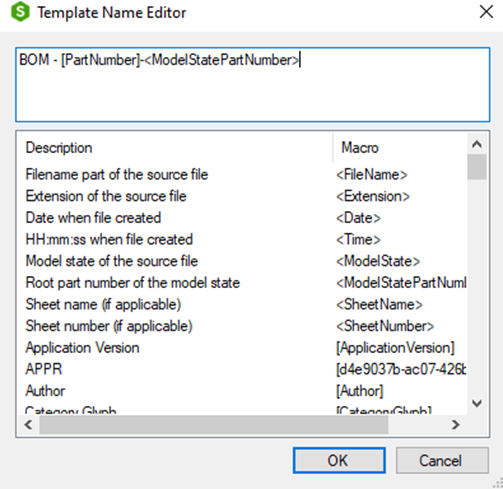
Secondary formats can now be exported with “All model states” selection. Sovelia Vault will now export all model states that have a unique part number. Just as the item master in Autodesk Vault does.

If the filename same as the source filename is set to “True” the filename will be “[ModelstateName]_Filename”.

You can also build a filename from the properties and model state identifiers in the Template Name Editor.
BOM from a file can now be exported with “All model states” and specific model state selection. Sovelia Vault will now export all model states that have a unique part number or a specific model state selected in the configuration.
Since Autodesk Vault doesn’t handle model states at the file level, the BOM export is not controlled. This means that the BOM exported will be from last checked in model state if we don’t specify this in the Sovelia Vault configuration. That’s why we have added the options to export model states.
Note! The model state functionality for file BOM requires Autodesk Inventor to be installed on the Job Processor.

If the filename same as the source filename is set to “True” the filename will be “[ModelstateName]_Filename”.

You can also build a filename from the properties and model state identifiers in the Template Name Editor.
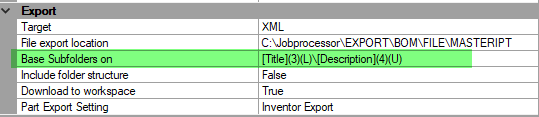
The way to define base subfolders is now more versatile. You can now select properties and set uppercase/lowercase and define how many characters from the left should be included in the name.
If you have used old base subfolders, you need to reconfigure it to get this new way of defining base subfolders into use.
Example
You can now select the Application protocol for Step file generation.


Previously there was only one line of text in the Sovelia Vault Property card. Now you can expand the textbox height to show more lines.


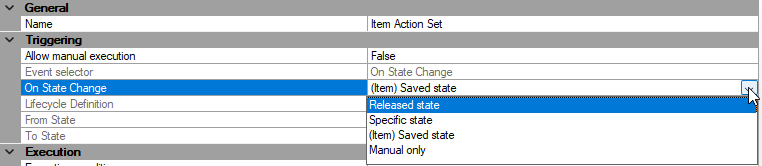
You can now set up to export item BOM when an item is saved. Some of our customers want to catch any change of an item. When an item is edited, updated, or created it needs a save and we can catch that and send the BOM to ERP or other systems.
Sovelia Configurator release news
Sovelia Core 25.2 focuses on improving usability, streamlining daily work, and strengthening overall system reliability.
Sovelia Plant 2026.1 is now out, supporting AutoCAD Plant 3D version 2026. This release includes all the functionality introduced in version 2025.1, but with even more improvements to make the design work easier for the user.