Sovelia Configurator Release News
Sovelia Configurator release news


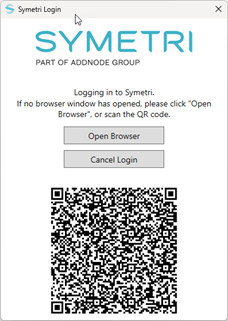
Sovelia Inventor 2025.2 includes improvements based on customer feedback, such as editing the BOM structure in the property editor. This version also includes necessary enhancements to support the improved SSO (Single Sign-On).
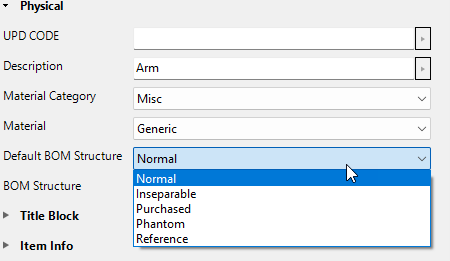
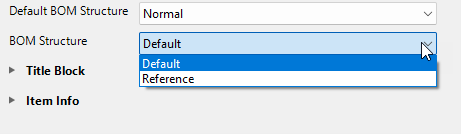
To simplify file management, you can now modify BOM (Bill of Materials) structures directly from the Property Editor.
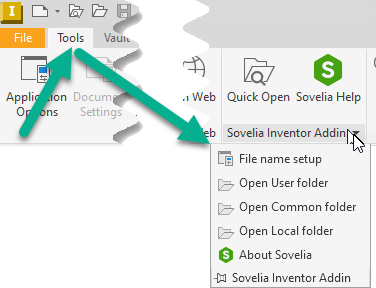
When launching Inventor with Sovelia Inventor, you can configure the required "File Name Setup" via a dropdown menu in the ribbon.
If Vault is installed with Inventor, the system will attempt to log in to retrieve numbering schemes. A new dialog will then appear, allowing you to configure file naming using four options as described below:
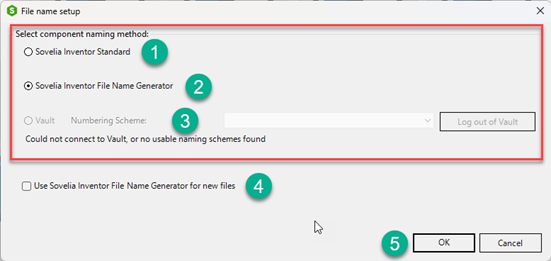
1. This is the "old" standard method to set up the file naming for Sovelia components.

2. This is to use the Sovelia Inventor file name generator for Sovelia components file naming.
3. If you have Vault Professional you can select a numbering scheme from Vault for Sovelia components file naming.
4. If you want the Sovelia Inventor filename generator to run on all new files you select this option.
See Sovelia Help for setup: Sovelia Inventor General Tools
Added: Setting for base view orientation in Draw Plates
Changed: SSO licensing component
Sovelia Configurator release news
Sovelia Core 25.2 focuses on improving usability, streamlining daily work, and strengthening overall system reliability.
Sovelia Plant 2026.1 is now out, supporting AutoCAD Plant 3D version 2026. This release includes all the functionality introduced in version 2025.1, but with even more improvements to make the design work easier for the user.